Have you ever been stuck waiting for a colleague to send you a file they won’t share until you send your progress report first, with neither of you willing to budge? That’s exactly how a deadlock works in tech systems, except instead of a missed team deadline, you get frozen servers, lost customer transactions, and thousands in lost revenue. I’ve worked in DevOps for 8 years, and I’ve seen small startup teams and enterprise operations alike grind to a halt because no one on staff knew how to spot this issue before it took down their entire e-commerce platform. Most people assume deadlocks are only a problem for computer science students studying for exams, but they pop up in every system that handles multiple concurrent processes, from your phone’s OS to cloud-based customer relationship management tools. We’ll break down exactly how these issues form, where they most often appear, and what you can do to fix them fast when they show up.
Core conditions that create a deadlock
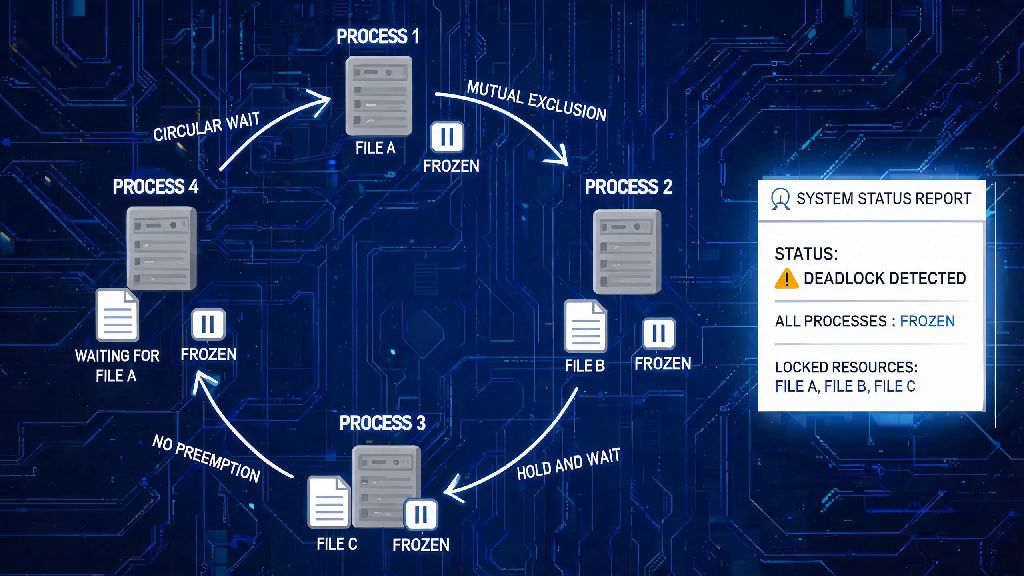
You don’t need a computer science degree to understand how deadlocks form, but it helps to know the four non-negotiable conditions that have to be met for one to take hold. First, mutual exclusion: At least one resource is being held in a non-shareable state, meaning only one process can use it at a time. That could be a database record locked for editing, or a printer assigned to one print job. Second, hold and wait: A process is holding at least one resource already, and waiting for additional resources that are being held by other processes.
Third, no preemption: Resources can’t be taken away from a process that’s holding them; the process has to release them voluntarily. If your system can force a process to drop a locked record after a set time, this condition isn’t met, and a deadlock can’t form. Fourth, circular wait: A chain of processes exists where each process is waiting for a resource held by the next process in the chain. All four of these have to be true at the same time for a deadlock to occur, which means you only have to break one of them to resolve the issue when it pops up. I’ve seen teams spend hours troubleshooting server performance issues without realizing they only need to break one of these four rules to end the problem in minutes.
Common places you’ll encounter a deadlock in daily tech operations
Deadlocks aren’t just hypothetical problems for lab environments. They show up in almost every type of tech stack, and knowing the most common spots can help you spot them early. First, operating systems: Your desktop or server OS handles hundreds of concurrent processes every second, all fighting for access to RAM, storage, input/output devices, and processing power. A few years back, I encountered this issue on a small business’s file server where two backup processes were each holding a portion of the backup storage allocation, and waiting for the other to release its chunk to finish running. The server froze completely for 3 hours before we could diagnose the issue, and the business lost a full day of customer order backups.
Databases are far and away the most common spot for deadlocks for most teams. When multiple users or applications try to edit the same set of records at the same time, it’s easy for a circular wait to form. For example, if one user is updating customer record A and waiting to update customer record B, while another user is updating B and waiting to update A, you get a deadlock before you even realize what’s happening. You might also see these issues in distributed systems, cloud resource allocation tools, and even IoT networks where connected devices are fighting for access to a central hub.
You don’t have to wait for a full system freeze to catch a deadlock if you monitor for these warning signs consistently:
Practical deadlock detection and recovery steps for small teams
When you suspect you’re dealing with a deadlock, you don’t need to bring your entire system down to fix it if you follow a structured process. First, confirm it’s actually a deadlock, not just a slow process or a resource shortage. Use your system monitoring tool to check for the circular wait condition: map out which processes are holding which resources, and which they’re waiting for. If you can see a clear chain of waiting processes, you’ve confirmed it’s a deadlock. Don’t skip this step; I’ve seen teams waste hours trying to fix a deadlock that was actually just a server running out of RAM from a poorly optimized plugin.
Next, pick the lowest-impact recovery method for your use case. The most common method is process termination, where you end one or more processes in the circular wait chain to break the deadlock. You don’t have to end all of them, just one, and you should prioritize ending processes that have the least unsaved work, or the lowest priority for your business operations. For example, if you have a deadlock between a customer checkout process and a monthly inventory report process, you’d terminate the inventory report first to avoid losing sales. The other recovery method is resource preemption, where you take a resource away from one of the processes in the chain and assign it to another. This works best for non-editing tasks, like read-only database queries, where you don’t risk corrupting data by moving the resource mid-process. Just make sure you don’t pick the same process to preempt every time, or you’ll end up with a process that never finishes running entirely.
Easy deadlock prevention techniques you can implement today
Fixing a deadlock after it happens is fine, but preventing them entirely saves you all the downtime and lost revenue that comes with a system freeze. The good news is you don’t have to rebuild your entire tech stack to implement these protections. First, eliminate the hold and wait condition by requiring all processes to request all the resources they need at once, before they start running. If a process can’t get every resource it needs upfront, it doesn’t start running at all, and releases any resources it already requested so other processes can use them. This does have a small downside: it can lead to lower resource utilization, because a process might hold onto a resource it doesn’t need for hours until it gets all the other ones it needs.
Second, eliminate the no preemption condition by setting timeouts for all locked resources. If a process holds a resource for longer than your set timeout window, the system automatically takes the resource back and rolls back any changes the process had made. Set timeout windows based on the average time your processes take to complete, so you don’t interrupt normal operations unnecessarily. Third, eliminate the circular wait condition by assigning a numerical ranking to every resource in your system, and requiring all processes to request resources in order of that ranking. For example, if customer records have a lower rank than inventory records, a process can’t request an inventory record before it requests any customer records it needs. This breaks the circular wait chain entirely, and it’s the most common prevention method used in modern database management systems.
At the end of the day, a deadlock isn’t some unbeatable tech problem that only senior engineers can fix. Once you understand the four core conditions that cause it, you can spot the warning signs early, resolve it fast when it pops up, and implement simple protections to keep it from happening in the first place. You don’t have to implement every prevention method at once, either. Start with adding resource timeouts to your highest-risk systems, like your customer-facing database, and build out your protections from there. The small amount of time you spend setting up these rules will save you hours of downtime and thousands in lost revenue down the line.