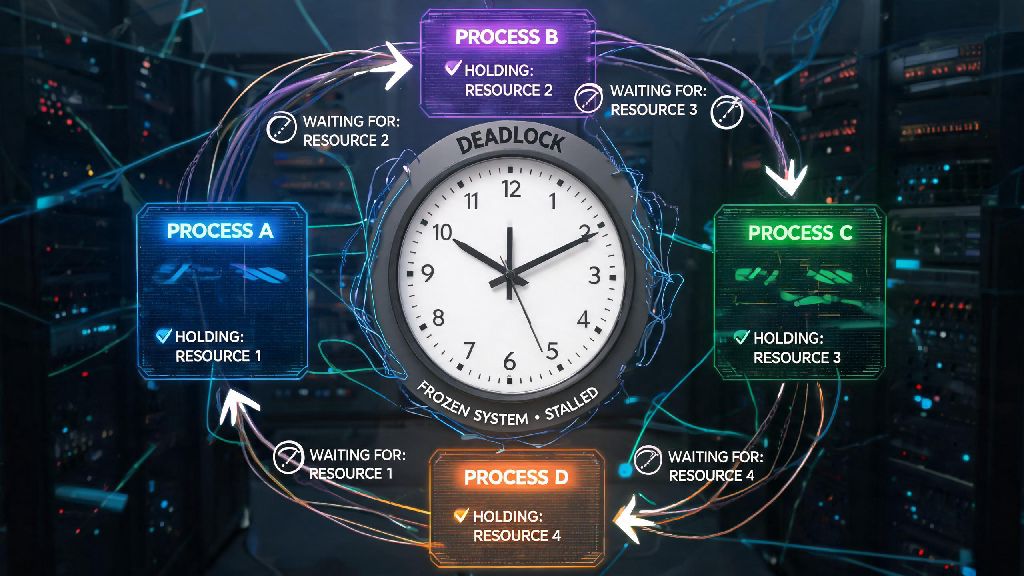
Imagine you’re rolling out a new seat booking feature for a local event platform. Halfway through user testing, you notice multiple test sessions freeze completely when two users try to book the last remaining seat at the exact same time. There’s no error message, no crash alert, just an unresponsive screen that won’t load no matter how long you wait. After three hours of digging through thread logs and database queries, you find the culprit: a deadlock. If you’ve ever run into this frustrating, hard-to-trace issue, you’ve likely asked what is a deadlock in programming, and how you can avoid wasting hours debugging it in the future. This guide breaks down everything you need to know, from core causes to easy fixes you can implement today.
Core Conditions That Cause a Deadlock in Programming
Deadlocks don’t happen randomly. They only occur when four specific conditions, called the Coffman Conditions, are all met at the same time. You don’t need to memorize the name, but understanding each condition will help you spot deadlock risks before they make it to production. All four have to be present for a deadlock to take hold, so eliminating even one of them will keep your system safe.
A lot of new developers assume deadlocks only happen in low-level operating system code, but they pop up in every type of software, from mobile apps to cloud-based SaaS platforms. If you’ve never had to debug a deadlock in programming before, you’re almost guaranteed to run into one eventually as you work on more complex, concurrent systems.
Common Real-World Deadlock Scenarios Developers Face
You don’t have to be working on kernel code to run into deadlocks. They show up in everyday development work far more often than you might think. One of the most common spots I’ve seen deadlocks is in e-commerce checkout flows, just like the seat booking example I mentioned earlier.
For example, when processing a payment, your code might first lock the user’s shopping cart record to mark it as purchased, then try to lock the user’s payment record to charge their card. If another process is already handling a refund for that same user, it might lock the payment record first, then wait to access the shopping cart record to update the refunded item status. You now have a perfect circular wait, and both processes will hang forever, leaving that user stuck with a broken checkout or refund flow.
Distributed system deadlocks are even harder to spot, because the processes holding resources are running on different servers across multiple regions. You won’t see a single local log that shows the full chain of waiting processes, so you might spend days tracing the issue across different cloud instances. These deadlocks can cost thousands of dollars in lost revenue if they hit during a peak sale period, because they can take down entire checkout systems for hours until you manually restart all affected services.
Deadlocks also pop up in database work all the time, even if you’re just writing standard SQL queries. If you run two concurrent transaction that update the same set of rows in reverse order, your database will hit a deadlock immediately, and one of the transactions will be rolled back automatically. Most databases will log these events, but if you’re not checking those logs regularly, you might miss them entirely until users start reporting failed actions.
How to Detect Deadlocks in Your Codebase
Catching deadlocks before they hit production is way better than fixing them after users start complaining. The first step is to know what signs to look for during testing. If you notice that certain test cases hang randomly, especially under high concurrency loads, that’s a huge red flag for a potential deadlock. Don’t write it off as a random test glitch; take the time to investigate why it’s hanging.
Most modern development tools have built-in features to help you spot deadlocks early. For backend code, deadlock detection tools built into your operating system or cloud monitoring platform can track which threads are holding which locks, and flag any circular wait chains automatically. For database code, most relational databases like PostgreSQL and MySQL log deadlock events directly to your error logs, so you can see exactly which queries are conflicting and adjust your transaction order accordingly.
You can also run stress tests on your code with hundreds or thousands of concurrent users simulating real-world actions. If your system starts freezing or hangs during these tests, you can pause execution and inspect the lock state to find any deadlocked processes. Don’t skip these stress tests, especially for features that handle payments, user data, or other high-stakes operations. I once worked on a project where we skipped concurrency testing for a new booking feature, and we ended up with 3 hours of downtime on launch day because of a preventable deadlock that would have been caught with a 10-minute stress test.
For local development, most IDEs have built-in debuggers that let you inspect thread states in real time. If you’re running a test that hangs, you can pause the debugger and look for threads that are stuck waiting for a lock that’s held by another thread. It’s a simple trick that saves me hours of digging through logs every time I run into a potential deadlock during development.
Simple Actionable Steps to Prevent Deadlocks
You don’t need to rewrite your entire codebase to eliminate deadlock risks. There are small, easy changes you can make to your development workflow to stop deadlocks before they happen. The most effective fix is to eliminate one of the four Coffman Conditions we covered earlier, so all four can never be met at the same time.
The easiest condition to eliminate is circular wait, and you can do that by implementing ordered resource locking. All you have to do is set a global order for accessing shared resources, and make sure every process in your codebase accesses resources in that exact order. For example, if you set the rule that user payment records are always accessed before shopping cart records, you’ll never have one process holding the cart and waiting for payment, while another holds payment and waits for the cart. Both will go for the payment record first, so one will wait until the other is done, no loop created.
Another simple fix is to add timeouts to all lock requests. If a process can’t get access to a resource within a set amount of time, it releases all the resources it’s currently holding, waits a random amount of time, and tries again. This breaks the hold and wait condition automatically, and it’s especially useful for distributed systems where it’s hard to enforce a global resource order. Just make sure you don’t set the timeout too short, or you’ll end up with unnecessary retries that slow down your system for regular users.
You can also eliminate the no preemption condition for resources where it’s safe to do so. For example, if a process is holding a lock on a non-critical resource like a user’s wishlist record, you can set up rules to revoke that lock if another higher-priority process needs it. Just make sure you only do this for resources where partial writes won’t corrupt data, or you’ll end up with bigger problems than deadlocks. Avoid preemption for financial or personal data records at all costs, because a partial write can lead to incorrect account balances or lost user data that’s impossible to recover.
If you’re working with databases, you can also reduce deadlock risk by keeping your transactions as short as possible. The longer a transaction runs, the longer it holds locks, and the higher the chance it will conflict with another concurrent transaction. Avoid running long, complex queries inside a transaction, and only lock the exact rows you need instead of locking entire tables when you don’t have to.
Deadlocks are one of the most frustrating issues you can run into as a developer, but they’re far from unbeatable. Once you understand what is a deadlock in programming and the four conditions that cause it, you can spot risks early, test for them before launch, and implement simple fixes to keep them from impacting your users. You don’t need to be an operating systems expert to prevent deadlocks – just follow the simple rules we covered, and you’ll save yourself hours of frustrating debugging down the line.